Cart abandonment is an observation: someone added an item to a cart but did not produce a tracked purchase within the period you defined. A broken checkout is a diagnosis: a functional failure prevented an intended shopper from completing a tested step.
A broken checkout can cause abandonment. But an abandoned cart does not, by itself, prove that anything broke. The shopper may have been comparing prices, checking shipping, saving an item, switching devices, encountering a card decline, or simply deciding not to buy. Your analytics may also have missed an event that the store completed.
That distinction changes the response. If the path is broken, conversion experiments and recovery emails do not repair it. If the path works, emergency plugin changes can introduce risk without explaining the behaviour. Diagnose the buying path first, then decide whether the next job is reliability, measurement, or optimisation.
Cart abandonment and checkout failure produce different kinds of evidence
Google Analytics recommends separate ecommerce events for adding an item to a cart, beginning checkout, and purchasing. And for good reason: those stages can tell you where a tracked journey stopped. But they do not tell you why.
Your implementation matters too. Google’s Funnel exploration can use an open funnel, where people may enter at any step, or a closed funnel, where they must enter at the first step. A person who misses a required event can fall out of a closed funnel even if they continue shopping. Attribution windows, consent, blockers, cross-device journeys, duplicate events, and event-tag changes can further alter the picture.
Use these working definitions:
- Cart abandonment: an item was added to a cart, but no purchase was attributed within the chosen definition and window.
- Checkout abandonment: checkout began, but no purchase was attributed within the chosen definition and window.
- Failed or pending order: WooCommerce created an order record, but its payment or processing state needs interpretation.
- Broken checkout: a repeatable functional problem blocks the intended scenario at a named step, such as add to cart, address validation, shipping selection, payment-method display, submission, or order confirmation.
The first three are data states. The fourth is a conclusion supported by reproduction and operational evidence.
A comparison framework for diagnosis
| Observation | What it safely shows | What it does not prove | Best next evidence |
|---|---|---|---|
| Add-to-cart event without purchase | No tracked purchase was attributed to that cart journey in the defined window | That checkout loaded, failed, or was even attempted | Confirm the event definition and identify the last reliable stage |
| Checkout start without purchase | The tracked journey reached your checkout-start condition but not the purchase condition | Why the shopper stopped | Segment the drop and test the affected scenario |
| Customer reports a visible error | One shopper encountered a symptom in a particular context | The root cause, scope, or prevalence | Timestamp, screenshot, device, product, address, payment method, and reproduction |
| Same step fails repeatedly in a fresh browser | Strong evidence of a functional failure in that scenario | That every shopper or checkout path fails | Preserve evidence and isolate the smallest relevant change |
| WooCommerce order is Pending payment or Failed | An order exists in a payment-related state | That the checkout page is broken | Compare order notes and status with gateway records and current gateway guidance |
| Orders exist but purchase events fall | Store and analytics records disagree | Which system is wrong | Reconcile order timestamps and IDs with event collection before editing checkout |
Don’t put “no purchase,” “payment declined,” and “checkout broken” into one bucket. For example, WooCommerce defines Pending payment as an order received without payment, generally awaiting customer action. Its Failed status can reflect a failed or declined payment, but in WooCommerce an abandoned pre-payment order can later become Failed after the hold-stock window expires. The order status is a lead, not a complete root-cause report.
Use several checks to find the real problem
Start with the least invasive evidence and move deeper only when the question requires it.
1. Check what your analytics are measuring
Note what counts as add_to_cart, checkout start, and purchase. Record the reporting window, funnel type, identity rules, timezone, filters, and any recent tag or consent changes.
Then ask whether WooCommerce orders and revenue changed with the analytics metric. If completed orders are stable while purchase events fall, investigate measurement before changing the buying path.
2. Find the narrowest affected segment
Compare before and after the change, then segment by dimensions that can alter checkout behaviour:
- product or variation;
- guest versus logged-in customer;
- mobile versus desktop and browser family;
- country, state, postcode, and shipping zone;
- payment method;
- coupon or no coupon;
- campaign or landing page; and
- checkout type or recently changed extension.
A broad aggregate can hide a complete failure in one important segment. It can also make ordinary changes in traffic mix look like a checkout defect.
3. Preserve a customer symptom
If a shopper reports an error, collect the context: time, visible message, page or step, device/browser, product, destination, and selected payment method. Do not ask for a full card number, password, or unnecessary personal data.
Look for other reports with the same step and context. Similar wording can help you reproduce a symptom, but customer reports alone do not establish the root cause.
4. Reproduce the customer’s path in a fresh browser
Use a logged-out or private browser, not an administrator session with saved cookies. Follow the exact affected product, variation, address, shipping, coupon, device, and payment choice when it is safe to do so.
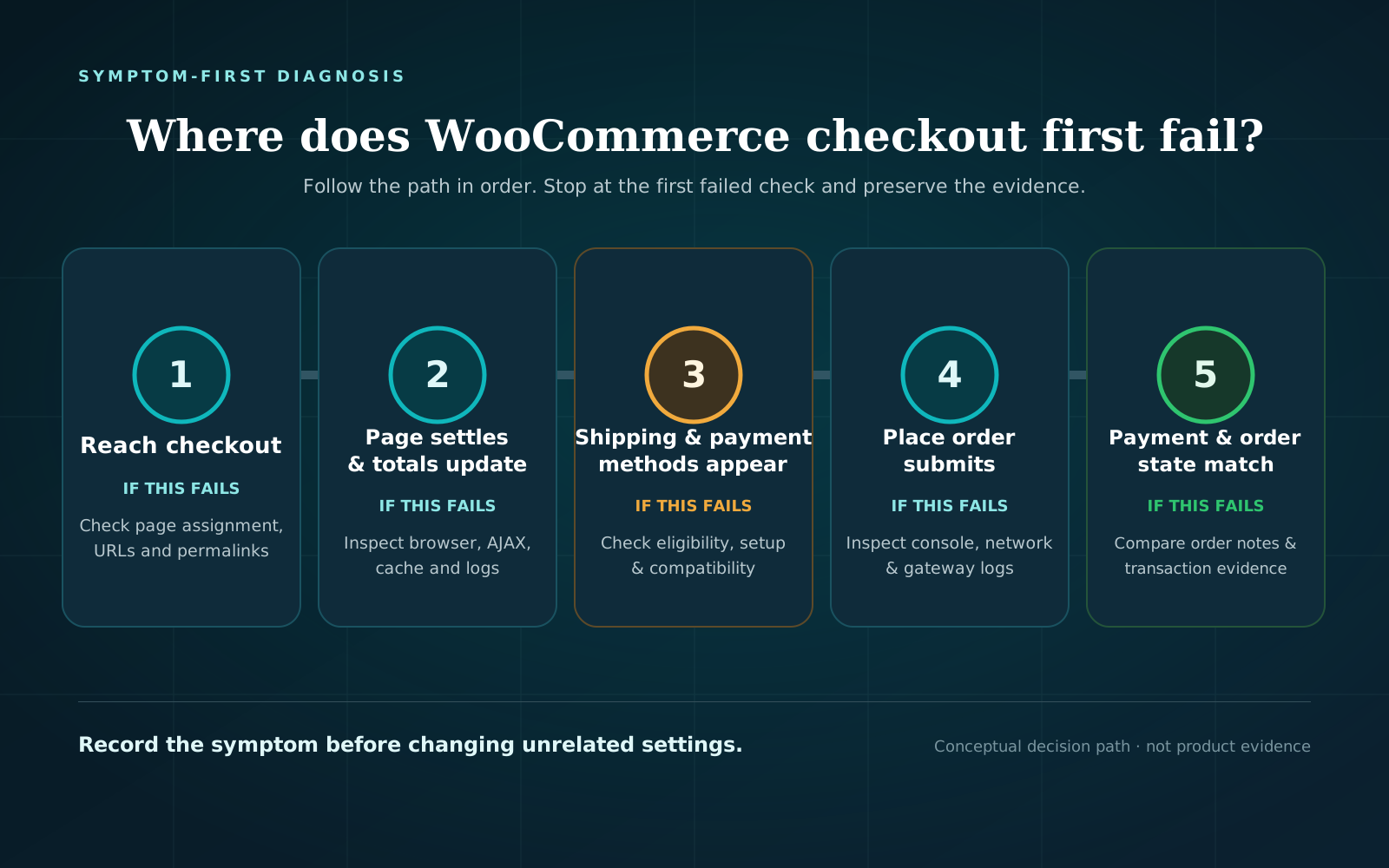
Record the first failed step rather than only the last page reached. “Checkout failed” is less actionable than “the expected payment method did not appear for this cart and postcode on mobile.”
A no-submit browser journey is useful when the question is whether a shopper can reach payment selection. It can test product, cart, checkout fields, shipping options, payment-method visibility, and the Place order control without creating an order. It cannot prove payment authorization or anything after submission.
Run a free checkout test to check a customer product-to-payment-step path. The test does not submit payment or create an order, and its result is point-in-time evidence for that scenario—not an explanation for every abandoned cart.
5. Reconcile order, payment, and store evidence
If the symptom occurs after Place order, a no-submit test is not deep enough. Check:
- whether WooCommerce created an order;
- its status and order notes;
- the gateway’s transaction or attempt record;
- relevant WooCommerce and gateway logs;
- the exact customer-facing message; and
- whether the purchase event or confirmation page fired.
A bank decline can be a valid payment outcome rather than a broken checkout. A successful gateway payment with an unexpected WooCommerce status is a different problem from a shopper who never reached submission. Keep the states separate until the records agree.
6. Use a controlled transaction only when needed
When the question is whether payment authorization and order creation work, use the payment gateway’s current test procedure. WooCommerce recommends performing test payments on staging. Its guidance also warns that test orders can trigger emails, appear in analytics, and affect integrations, and core WooCommerce does not give every test order a universal special status.
Define the expected order status and downstream effects before testing. A staging transaction can verify more of the flow, but it does not prove every production-only credential, rule, or external service.
Do you have an abandonment, measurement problem, or broken checkout?
Answer these questions:
- Did the definition or tracking change? If yes, reconcile events with WooCommerce orders before interpreting the trend.
- Did completed orders also change? If no, prioritize analytics validation. If yes, continue.
- Is the change concentrated by step, product, device, address, or payment method? Test that exact segment. If no segment is clear, choose the highest-value representative journeys rather than changing the whole checkout blindly.
- Can you reproduce a pre-submit failure in a fresh browser? If yes, treat it as functional-failure evidence, preserve the first failed step, and inspect the smallest relevant set of changes. If no, continue gathering evidence.
- Does an order exist? If no, focus on the product-to-submission path, browser errors, network responses, and validation. If yes, compare WooCommerce status and notes with the gateway record.
- Does a controlled test produce the expected payment and order state? If no, investigate the payment/order path. If yes, the original signal may be scenario-specific, intermittent, behavioral, or measurement-related; do not invent a cause.
- After a justified fix, does the same scenario pass? Rerun the original journey. A different product, browser, or gateway is not direct recovery evidence.
“Unresolved” is a valid diagnosis state. It is safer than labeling all abandonment as customer choice or all lost purchases as a checkout incident.
Practical diagnostic checklist
Use this before launching discounts, redesigning checkout, or disabling production plugins.
Measurement
- Define add to cart, checkout start, purchase, reporting window, and open/closed funnel behavior.
- Compare analytics events with WooCommerce completed orders over the same timezone and period.
- Check for recent tag, consent, checkout-template, thank-you-page, or analytics changes.
- Exclude known test traffic and account for test orders where possible.
Scope
- Identify when the signal changed and the first affected step.
- Segment by product, device/browser, customer state, destination, shipping method, payment method, and coupon.
- Preserve customer-reported wording without collecting payment credentials or unnecessary personal data.
- Record recent WooCommerce, theme, gateway, checkout-extension, cache/CDN, and custom-code changes.
Evidence
- Reproduce from a fresh logged-out browser using the affected scenario.
- Confirm the item stays in the cart and expected totals appear.
- Confirm checkout fields accept the test data and the expected shipping choice appears.
- Confirm the expected payment method and Place order control are visible.
- State whether the test stops before submission or uses an approved transaction mode.
- Save the timestamp, first failed step, URL, browser, screenshot, and relevant console/network evidence.
Payment and order evidence
- If an order exists, inspect status and notes before calling it abandoned.
- Compare WooCommerce state with the gateway attempt or transaction.
- Use the gateway’s current documentation for decline and test-mode interpretation.
- Avoid repeatedly submitting or refunding live orders as an improvised test.
Recovery
- Change one justified variable at a time.
- Rerun the same scenario after the change.
- Confirm analytics recovery separately from functional recovery.
- Add a recurring checkout check if the failure mode deserves ongoing coverage.
If the path works now but deserves recurring evidence, review the available checkout monitoring plans after you have defined the scenario and proof boundary.
What the common patterns suggest and what they don’t
Many carts, few checkout starts
This can reflect low purchase intent, unexpected cart information, a cart interaction problem, or missing checkout-start tracking. First verify that the checkout control works and that the event fires under the same conditions. Only then prioritize messaging, pricing, shipping disclosure, or other optimization work.
Checkout starts, but purchases fall on one device or method
This is a stronger reason to test that segment. Reproduce the same device/browser and payment choice. Inspect visible errors and network activity. If submission occurs, reconcile the order with gateway evidence. Do not assume the whole checkout is broken when one path is affected.
Failed or Pending payment orders increase
These records move the investigation beyond pure cart abandonment, but they still need interpretation. Separate customer action, legitimate decline, gateway communication, and store processing. Use status, notes, gateway records, and timestamps together.
Purchases exist in WooCommerce but not analytics
Treat this as an instrumentation discrepancy until evidence says otherwise. Confirm whether the purchase event depends on a confirmation page, consent state, browser script, or recent template change. Fixing checkout layout will not necessarily restore event collection.
A fresh-browser journey fails at the same step
You now have stronger evidence. Preserve it before clearing caches or disabling extensions. Check changes most directly connected to that step, apply the smallest safe remediation, and rerun the identical path.
Frequently asked questions
Is every abandoned cart a lost sale?
No. An added item shows interest, not a commitment to purchase. Some shoppers compare options, save carts, switch devices, or leave intentionally. Use “no attributed purchase in the defined window” rather than assuming every cart would otherwise have converted.
What is the difference between cart abandonment and checkout abandonment?
Cart abandonment starts from an item added to cart. Checkout abandonment starts from whatever your implementation defines as beginning checkout. Checkout abandonment is therefore a later, narrower stage, but neither metric identifies the cause without more evidence.
Does a Failed WooCommerce order prove checkout is broken?
No. WooCommerce says Failed can mean payment failed or was declined, and status timing can depend on the gateway. It can also follow an abandoned pre-payment order after the hold-stock window expires. Inspect order notes and gateway records for the specific case.
Can a manual test rule out a broken checkout?
It can rule out a repeatable failure in the exact scenario you tested at that moment. It does not cover other products, devices, browsers, destinations, customer states, coupons, gateways, or intermittent conditions. Match the test to the affected segment.
Should I send cart-recovery emails before investigating?
Recovery messaging may be appropriate for a working path, but it should not be the first response. Confirm that the intended checkout scenario works before sending shoppers back into it.
Diagnose first, then optimize
Start with what you know: this group of shoppers stopped between two measured steps during a specific period. Test that same checkout path and compare the result with WooCommerce and payment-gateway records. If the evidence does not show a cause, call it unresolved.
If the path works, then look at ordinary abandonment and conversion issues. If it fails, fix the specific problem and rerun the same test before sending shoppers back.
Run a free checkout test to check one public product-to-payment-step journey. It does not submit payment or create an order, so use separate order and gateway evidence when you need to verify payment completion.