Uptime monitoring and checkout monitoring answer different questions.
An uptime monitor checks whether a configured page or endpoint responds and, depending on its setup, whether the response has the expected status, timing, or content. Ecommerce checkout monitoring uses a browser or scripted journey to interact with a selected buying path: open a product, add it to the cart, continue to checkout, enter safe details, and check the expected shipping and payment choices.
Keep the uptime monitor. It is a useful availability signal. Add checkout monitoring when you also need evidence that a buyer can move through the revenue path. Then state where that journey stops, because seeing a payment method is not the same as authorizing payment or creating an order.
The short comparison
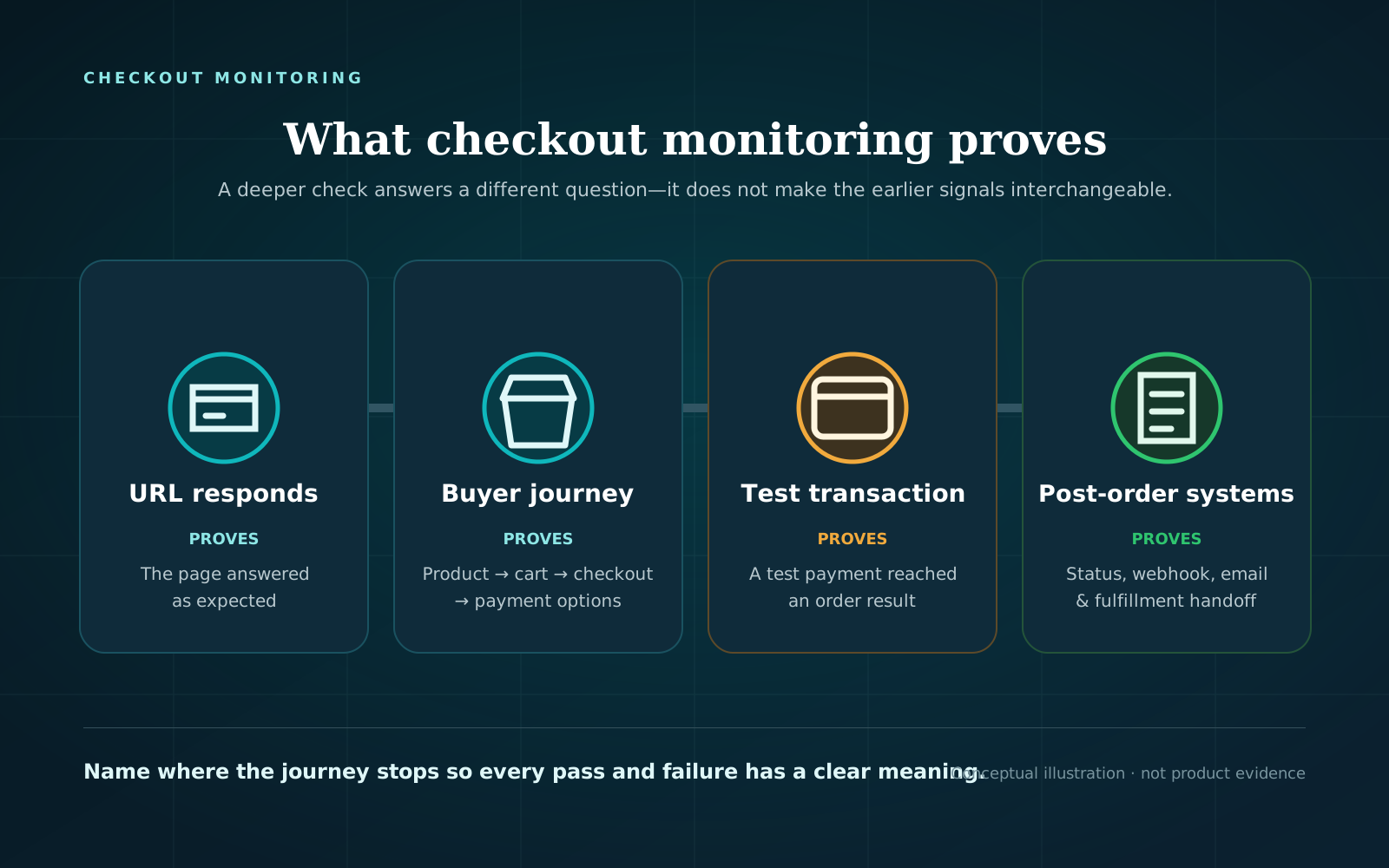
| Monitoring layer | Question it answers | Typical evidence | What a green result does not prove |
|---|---|---|---|
| Uptime or page check | Did this URL respond and satisfy the configured conditions? | Status, latency, response body or content assertion, check location and time | That a shopper can use a separate product, cart, checkout, shipping, or payment interaction. |
| Browser checkout journey | Could this browser complete the selected product-to-checkout steps? | Step results, failed step, screenshot, browser log or trace | An untested product, address, browser, gateway, or payment authorization. |
| Approved test transaction | Did the test gateway and store create the expected order in this scenario? | Gateway response, test order, order status and notes | Live credentials, production-only rules, or every downstream integration. |
| Post-order verification | Did selected systems react correctly after the order? | Webhook, status, email, inventory, subscription or fulfillment assertions | Any system or scenario the test did not observe. |
These layers are cumulative, not competing. A fast URL check can detect broad availability trouble without running a cart session. A browser journey adds functional evidence. A submitted test transaction adds payment and order evidence but also introduces side effects and safety work.
How can uptime be green while checkout is broken?
In WooCommerce the buying path crosses separate behaviour:
- A product must load and be purchasable.
- Add to cart must change the shopper’s cart state.
- The cart must retain the expected item and totals.
- Checkout must load and accept the scenario’s required details.
- A suitable shipping method may need to appear for the cart and destination.
- An expected payment method and the Place order control must be available.
- If the test submits, the gateway and WooCommerce must process the attempt and create the expected order state.
- Post-order systems may need to receive webhooks, send email, update inventory, or start fulfillment.
For WooCommerce a Cart and Checkout are separate pages, with Checkout displaying shipping and payment options. A monitor that requests only the homepage does not traverse those steps. Even a direct request to the checkout URL might not create a cart, enter an address, or cause conditional payment methods to appear.
This doesn’t mean every green-uptime/red-checkout combination is a store failure. The checkout runner, its network, DNS, consent handling, bot protection, or test data can also fail. Good checkout monitoring records the first failed step and enough evidence to distinguish a buyer-path problem from a monitoring problem.
What uptime monitoring does well
Uptime monitoring is valuable precisely because it can be narrow.
A simple check can repeatedly request a public page or endpoint from outside the hosting environment. Depending on the tool and configuration, it can validate a status, response content, certificate, timing, or network path. That gives operators a focused signal for questions such as:
- Is the storefront reachable from this location?
- Does the response contain an expected marker rather than an error page?
- Did response time cross the configured threshold?
- Is a public API or health endpoint responding?
Google Cloud’s monitoring distinguishes uptime checks from configurable synthetic monitors that can run a sequence of tests. That is a useful model even if your tools use different names: check the resource when availability is the question; run a journey when interaction is the question.
Do not judge an uptime monitor by a promise it never made. If it was configured to request one URL, a green result means the check passed. The mistake is translating that result into “all checkout paths work.”
What checkout monitoring adds
Checkout monitoring adds actions, state, and business-specific expectations.
For a WooCommerce store, a practical no-submit browser journey can:
- open a selected product or variation;
- use its add-to-cart path;
- confirm that the cart contains the item;
- review visible quantity, currency, and totals;
- open checkout in a fresh browser context;
- fill safe customer and address fields;
- check a named shipping method for the chosen cart and destination;
- check that an expected payment method and Place order control are visible; and
- retain a timestamped step result and browser evidence.
This is sometimes called synthetic monitoring or synthetic transaction monitoring. In this article, “transaction” means a scripted ecommerce journey. Some no-submit journeys do not create a financial transaction at all.
The scenario must be explicit. A simple physical product shipped to one US ZIP code may take a different path from a subscription, virtual product, local pickup order, logged-in wholesale customer, international address, coupon, or mobile wallet. A passing run proves that the configured scenario passed at that time. It is not universal checkout certification.
Choose where the checkout test stops
The stopping point determines what the result proves and what side effects it can cause.
Option 1: Stop before order submission
A no-submit production journey can check the public path through payment-method visibility without charging a payment method or creating an order. This is suited to a recurring question such as: “Can a logged-out shopper with this cart and address reach the expected payment choice?”
It does not prove payment authorization, order creation, webhook delivery, order email, inventory changes, subscriptions, analytics, or fulfillment.
Run a free checkout test to check a public WooCommerce path through the payment step. The test does not submit payment or create an order.
Option 2: Submit a sandbox transaction on staging
Use a transaction-level test when the question requires payment and order proof. WooCommerce says test orders can evaluate a payment method, the checkout process, and order-related integrations, and recommends staging for test payments.
Follow the active gateway’s current test-mode instructions. Define the expected order status and downstream assertions before running the test. A sandbox result still does not prove live credentials, production-only fraud controls, live webhooks, or every store rule.
Test orders also need operational care. In WooCommerce they can trigger order emails and appear in analytics. Other connected systems may react too. Identify, contain, and clean up those effects rather than assuming the word “test” makes the order inert.
Option 3: Use a controlled production transaction
Some production-only conditions cannot be reproduced on staging. A controlled live transaction is an operational procedure, not a default monitoring shortcut. It requires gateway-approved test instruments or a legitimate payment method, an identified product, email and fulfillment controls, accounting and analytics handling, a cleanup plan, and an owner authorized to run it.
If those safeguards are not documented, combine a no-submit production journey with transaction testing on staging. Do not improvise repeated live orders and refunds as routine monitoring.
Option 4: Verify post-order systems separately
If the requirement is “the order email was delivered” or “the fulfillment system received the order,” make that an explicit assertion. Order creation alone does not prove every downstream process. Observe only the systems the test is authorized to reach, and record the expected state for each one.
Which monitoring mix should you choose?
Use this decision path.
- Do you need to know whether the public site or a critical endpoint responds? Start with uptime checks for the storefront and other carefully chosen resources.
- Do you need to know whether a shopper can move through product, cart, and checkout interactions? Add a recurring browser checkout journey.
- Would creating an order or payment attempt be unsafe in production? Stop before submission there. Use a sandbox transaction on staging when payment/order evidence is required.
- Do you need proof about email, webhooks, inventory, subscriptions, or fulfillment? Add system-specific post-order assertions. Do not infer them from a checkout page or newly created order.
- Would one scenario miss a material path? Add a second scenario only for a named risk, such as a different gateway, shipping zone, product type, customer role, or browser profile.
- Can someone act on the alert? Assign an owner and preserve the failed step, timestamp, expectation, and browser evidence.
A small monitoring portfolio with written boundaries is more useful than a large set of checks nobody can interpret.
Practical uptime and checkout monitoring checklist
Define the portfolio before choosing an aggressive schedule.
| Decision | Write down | Why it matters |
|---|---|---|
| Availability targets | Exact URLs/endpoints, expected status or content, locations | Prevents “site uptime” from meaning an undefined collection of pages. |
| Checkout scenario | Product/variation, customer state, address, shipping method, payment expectation, browser | Makes a pass reproducible and limits overclaiming. |
| Submission boundary | No submit, sandbox transaction, or controlled production transaction | Prevents accidental orders and false payment claims. |
| Expected result per step | Item in cart, named shipping option, named payment method, expected order state | A generic “page loaded” result can hide the actual requirement. |
| Evidence | Time, check location, first failed step, screenshot, trace or response detail | Gives the responder a starting point. |
| Alert threshold | First failure or confirmation policy | A confirmation can reduce noise but can also delay notification. |
| Frequency | Detection window the team can tolerate, plus run cost and side effects | There is no universal best interval. |
| Owner | Person or on-call role with access to store, host, gateway, and monitoring evidence | An unowned alert is only a notification. |
| Change trigger | Checkout-related plugin, theme, gateway, shipping, tax, cache/CDN, or custom-code change | Scheduled checks do not replace an immediate post-change test. |
| Recovery rule | Rerun the same failed scenario after the smallest justified change | A different scenario is not direct recovery evidence. |
| Coverage review | Named risks not covered by current scenarios | Keeps expansion deliberate rather than claiming completeness. |
| Failure drill | Safe way to confirm the alert route and response procedure | Validates the operating process without fabricating a real incident. |
For transaction tests, add side-effect controls for email, analytics, accounting, inventory, subscriptions, and fulfillment. For no-submit journeys, document that those systems remain outside the proof boundary.
How to interpret conflicting signals
Uptime green, checkout red
Look at the first failed checkout step. A cart-state problem, missing shipping option, checkout validation issue, or absent payment method can exist after the checked URL responds. Reproduce the same product, address, and browser state as a buyer. Also check whether the runner itself reported DNS, timeout, bot-protection, or infrastructure trouble.
Uptime red, checkout green
Check whether the monitors target the same host, route, location, and time. A browser journey may have used a different URL, followed a redirect, or run before or after the uptime failure. Do not average the signals into a pass; reconcile their scope and timestamps.
Both green
Record what passed, not “checkout is guaranteed.” The evidence is point-in-time and scenario-specific. Untested products, addresses, roles, devices, gateways, payment submission, and downstream systems remain outside scope unless separately observed.
How Checkout Watch fits the monitoring layers
Checkout Watch’s current connected-store browser journey opens a selected product, adds it to the cart, reviews cart contents and totals, opens checkout, fills safe details, and checks shipping methods, payment-method visibility, and the Place order control. Its safety guard confirms that it did not click Place order, submit payment, or create an order.
Scheduled runs can retain step results, screenshots, browser events, and traces; failed or warning runs can retain video. Qualifying incident notifications can be sent to eligible verified email or Slack recipients according to the configured threshold. This is evidence for the selected public buyer path through payment visibility, not proof of payment authorization or order completion.
After defining the coverage you need, you can see monitoring plans. Keep separate uptime and transaction checks where their evidence is still required.
Frequently asked questions
Does checkout monitoring replace uptime monitoring?
Usually no. The two checks have different scopes. Uptime monitoring gives a focused availability signal; a browser journey exercises selected interactions. Keeping both makes it easier to distinguish a broad outage from a checkout-specific or runner-specific failure.
Does checkout monitoring always place an order?
No. A no-submit journey stops before Place order. A transaction-level test submits through an approved sandbox or controlled setup and can create an order. The monitoring procedure should state the boundary before it runs.
How often should each monitor run?
Choose frequency from the acceptable detection window, operational cost, alert noise, and side effects. A lightweight URL check and a submitted transaction do not need the same cadence. Also run an on-demand journey after material checkout changes.
Can a green checkout monitor prove the store can take every order?
No. It proves only the configured steps, scenario, place, and time. If it stops before submission, it does not prove payment or order creation. Even a completed test transaction covers only the gateway, data, and systems observed in that run.
Build evidence one layer at a time
Start with one useful uptime target and one representative no-submit checkout journey. Write the expected result and proof boundary for each. Confirm that alerts reach an owner and include enough evidence to reproduce the failed step. Add a sandbox transaction or post-order assertion only when you need that deeper proof and can contain its side effects.
Run a free checkout test to see whether a public WooCommerce path reaches the payment step. It does not submit payment or create an order, so retain separate uptime and transaction-level checks for questions outside that boundary.